
Understanding your schedule
Why Do Prayer Apps Show Different Times?
Two prayer apps can show different times because they use different calculation methods, Asr settings, or locations. A mosque timetable may also show congregation times rather than the start of each prayer. Compare those details before deciding that a schedule is wrong.
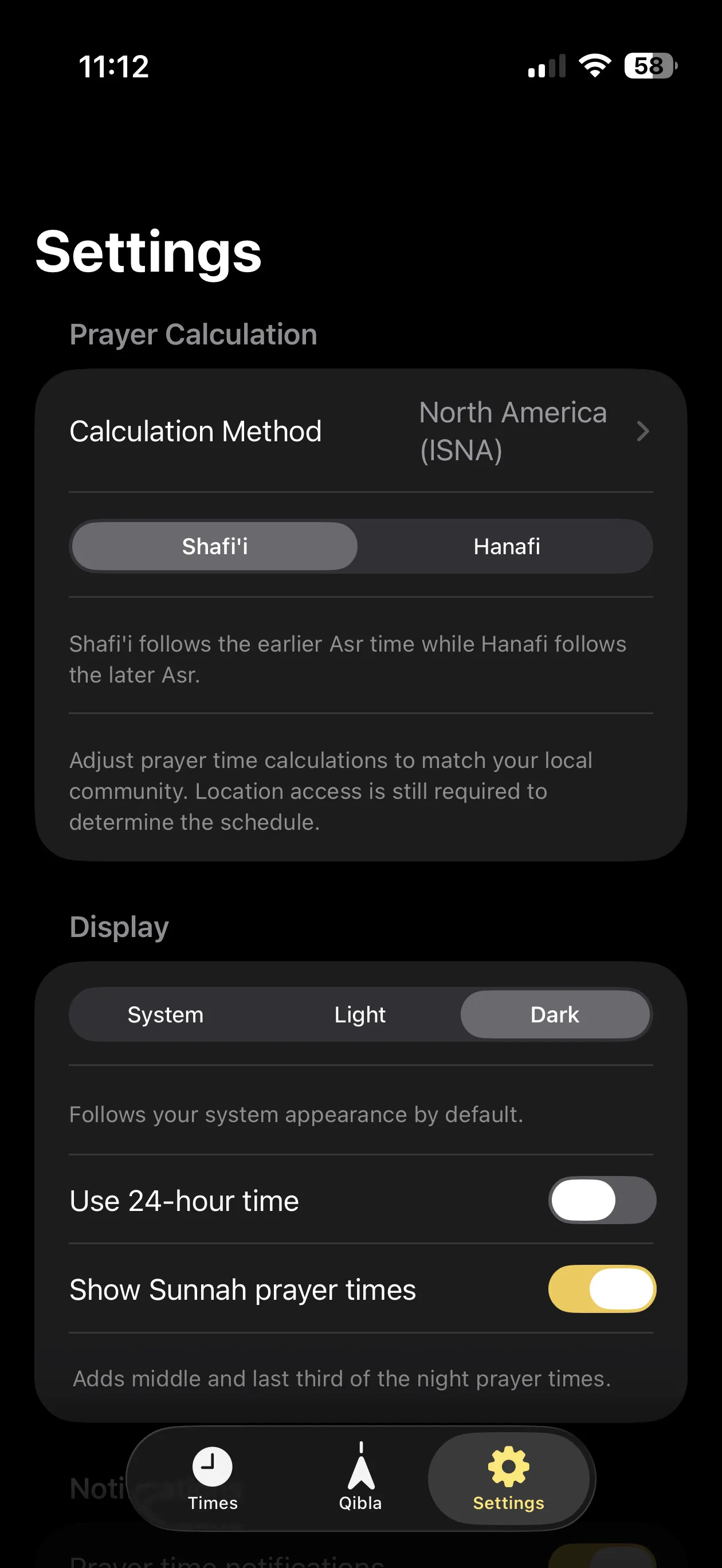
Fajr and Isha depend on the calculation method
Fajr and Isha are linked to dawn and evening twilight. Calculation conventions use different sun angles to represent those events; some use a fixed interval after Maghrib for Isha. Choosing ISNA, Muslim World League, or another method can therefore change these times for the same place and date.
There is no single setting that represents every community. Ask which method your local mosque uses and compare it with your app. Pray Times documents common calculation methods and their parameters.
Asr has a separate setting
Asr calculations use the length of an object’s shadow, accounting for its shadow at noon. The Hanafi convention uses a longer shadow threshold and gives a later Asr time than the standard convention used by Shafi‘i, Maliki, and Hanbali schools.
FiveTimes labels these options Shafi‘i and Hanafi in Settings. If only Asr differs, check this setting before changing the calculation method.
Check the place, date, and timezone
Prayer times follow the sun, so a nearby city can have a different schedule. Make sure you are comparing the same date and location, especially when travelling. Check timezone and daylight-saving settings if the difference is around an hour.
At higher latitudes, summer twilight can require additional calculation rules. Different implementations may use different adjustments. Pray Times explains the astronomy and high-latitude adjustments.
Prayer start time is different from congregation time
A mosque may list both the beginning of a prayer’s time and a later iqamah or jama‘ah time for the congregation. For example, a timetable might show Dhuhr starting at 12:15 and the congregation at 12:45. Those entries serve different purposes; the example is not a schedule for any particular location.
Ask the mosque which column you should compare with an app’s calculated start time. A congregation time does not mean the app’s calculation should be moved to that time.
A checklist for comparing your schedule
- Compare like with like: use the same date and location, and prayer start times rather than congregation times.
- Ask your mosque: confirm its calculation method, Asr convention, and any local timetable adjustments.
- Open FiveTimes Settings: under Prayer Calculation, check Calculation Method and the Shafi‘i / Hanafi selection.
- Check location access: confirm it is enabled for FiveTimes in iPhone Settings, then open the app to review the schedule.
- Compare each prayer: note which times differ and by how much. Share those details, the date, and your chosen method with FiveTimes support if you still need help.
This guide explains calculation settings. For religious guidance about the timetable to follow, ask your local mosque or a qualified scholar familiar with your community.